Python의 라이브러리 중 하나인 셀레니움(Selenium)을 사용해 웹페이지를 작동하다보면
DevTools listening on ws://127.0.0.1:11569/devtools/browser/8993e8c9-f546-48cc-b46c-a... 와 같은 에러가 나올때가 있습니다.
방법 1 버전 맞추기
이는 현재 설치되있는 Chrome의 버전과 웹드라이버의 버전이 맞지 않아서 생기는 오류입니다.
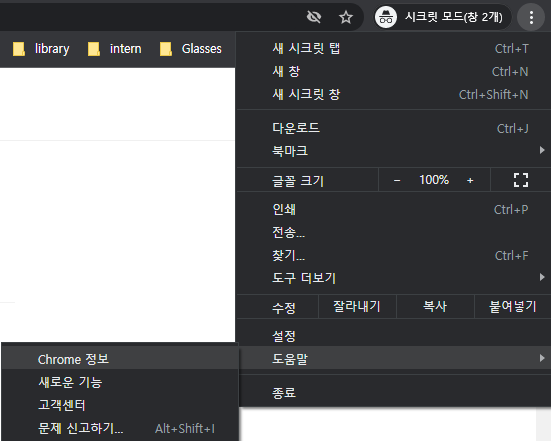
Chrome의 버전은 위와 같이 Chrome 정보란을 클릭해 확인할 수 있고,
최신 크롬 웹 드라이버는 아래의 사이트를 통해 다운로드 가능합니다.
ex) 크롬웹드라이버 - https://chromedriver.chromium.org/downloads
ChromeDriver - WebDriver for Chrome - Downloads
Current Releases If you are using Chrome version 99, please download ChromeDriver 99.0.4844.17 If you are using Chrome version 98, please download ChromeDriver 98.0.4758.80 If you are using Chrome version 97, please download ChromeDriver 97.0.4692.71 For o
chromedriver.chromium.org
버전이 다를 경우 이러한 에러도 출력됩니다.

둘의 버전을 맞춰주면 문제 해결!!
방법 2 로그 숨기기
options = webdriver.ChromeOptions()
options.add_experimental_option('excludeSwitches', ['enable-logging'])
driver = webdriver.Chrome('chromedriver.exe', options=options)
그럼 오늘도 즐거운 코딩!!
browser_switcher_service.cc(238)] XXX Init() error with Python Selenium Script with Chrome for Web Scraping
I was using a small python script along with chrome drivers to download manga from Mangafox. It used to run fine until a few days ago when I updated the Chrome Browser. The following error is shown...
stackoverflow.com
'코딩 | 개념 정리 > Python' 카테고리의 다른 글
| [pytube] AttributeError: 'NoneType' object has no attribute 'span' (0) | 2022.01.26 |
|---|---|
| [엑셀자동화with파이썬] Pandas 라이브러리 (0) | 2021.12.25 |
| [Python] Jupyter notebook 단축키 정리 (2) | 2021.09.06 |
| [Python] C언어와 비교한 변수와 입력 (0) | 2021.07.04 |
| [Python] 문자열 (0) | 2021.07.03 |